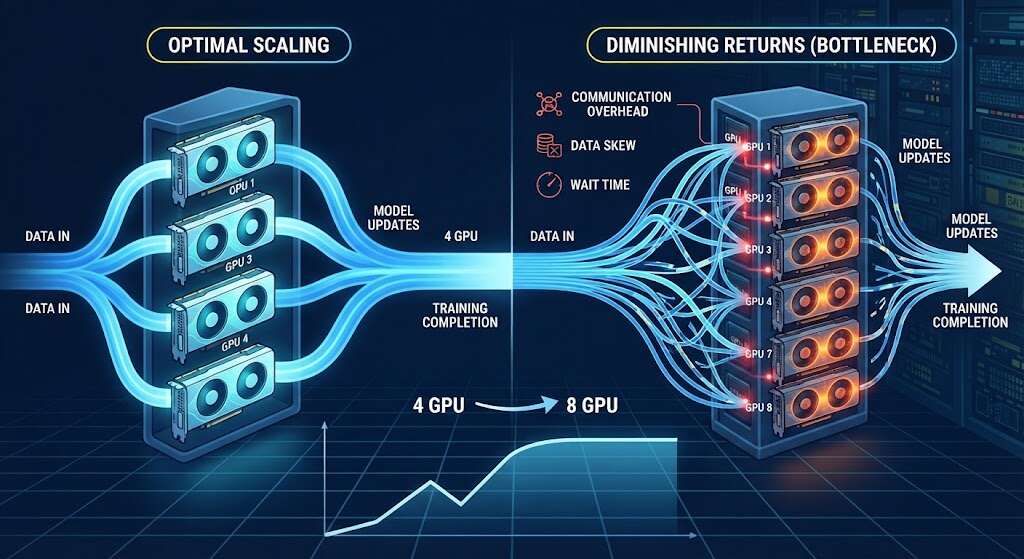
Certainly, using additional GPUs may help shorten AI training time, but the increase in efficiency is not linear. Even if the GPUs are highly capable, two GPUs will hardly double training speed. Indeed, eight GPUs can deliver less than an eightfold increase in performance.
What are the reasons for this phenomenon? The reason is that GPUs need to exchange data, load batches, synchronize operations, and at times wait for other devices.
The more the system grows, the lower the marginal utility of the additional GPU becomes. Let us see how this process works from inside.
Communication becomes part of the workload.
During distributed training, GPUs often process different parts of the same job and then exchange gradients or model data.
For example, think of one GPU finishing early. It may still wait for the others before the next training step begins, and frequent synchronization can even limit scaling. Even when ample compute capacity seems to be available.
Interconnect speed affects scaling.
The connection between GPUs determines how swiftly training data can move between devices.
Contextually, a GPU such as the RTX PRO 6000 Blackwell can support demanding AI development, fine-tuning, and suitable multi-GPU workloads through PCIe-based systems. Impressive, right?
Data center accelerators such as the NVIDIA H200 are designed for large AI workloads where high memory bandwidth and fast multi-GPU communication become more important. So, faster GPU communication means less time waiting.
Batch size can become a limit.
Every GPU needs enough “useful” work. Think of a global batch that is small; splitting it across several GPUs can leave each device with far too little data to process efficiently. Yet, larger batches can improve utilization, even if they change training behavior. Your team should test batch size and GPU count together for the best results.
The loading of data can slow down every GPU
The speed at which GPUs can train is limited by how quickly data can be supplied through the input pipeline. That’s that simple.
As more GPUs are added, storage, CPU preprocessing, and network throughput must keep up; a dataset loader that keeps one GPU busy may struggle when eight GPUs request batches simultaneously.
It is important to monitor GPU usage alongside data load time; low usage across multiple devices usually indicates a bottleneck elsewhere in the system.
Different models scale differently
The model’s design can also affect scaling. Think about the following:
- In the case of data parallelism, each GPU receives a copy of the model and then processes different training samples.
- Model parallelism means the model is split across several GPUs.
- Pipeline parallelism means different model stages run on different devices.
- It should be remembered that each method results in different communication and synchronization requirements.
Measure scaling efficiency, not GPU count
Now, the useful question to ask yourself (or your team) is how much training time each additional GPU actually saves.
Suppose one GPU completes training in 10 hours, and two GPUs complete training in 6 hours. Performance improved, but the workload did not scale to 2x.
That can still be worthwhile when delivery time matters. It may offer poor value when infrastructure cost is the priority.
Your team should track:
- GPU utilization
- Communication time
- Training step duration
- Data-loading time
- GPU memory
- Total training time
These measurements show where additional GPUs stop producing meaningful gains. In other words, whatever can be measured can be managed.
Verdict
The more GPUs you have, the more they can accelerate AI training when the rest of the system scales with them. However, also consider factors such as communication speed, batch size, data loading, memory, model architecture, and distributed training software, all of which influence the results. Efficiency matters!
It’s good to start with a baseline. Then add GPUs gradually and compare training times after each change. Some of the best multi-GPU configurations are those in which additional compute provides enough extra throughput to justify its overall cost.
Frequently asked questions
Why does multi-GPU training fail to scale linearly?
Multi-GPU training fails because communication, synchronization, and waiting reduce the benefit of each additional GPU.
Can storage slow multi-GPU training?
Yes. Slow storage or preprocessing can leave several GPUs waiting for data.
What should teams measure?
Track utilization, communication time, memory usage, data loading time, step duration, and total training time.